
Picking the right DDR5 speeds for your Intel build matters more than most people realize.
Not every frequency listed on a spec sheet translates to real-world gains, and going too high without the right board can hurt stability rather than help it.
This guide covers which memory frequencies and timings actually move the needle on Intel 12th, 13th, and 14th Gen CPUs, so you spend money where it counts.
DDR RAM You May Want to Shop
Explore More


Why DDR5 RAM Speed Matters for the Latest Intel CPUs
DDR5 changes the way memory works by offering higher bandwidth, more efficient power management, and better scaling with future processors.
Intel was the first to support DDR5, and each generation has improved memory tuning. This makes DDR5 speed more important on Intel than on older platforms.
Intel Uses a Strong Memory Controller
Intel’s integrated memory controller can handle high DDR5 frequencies with good stability. This controller sends instructions between the RAM and CPU. Higher speeds increase the amount of data that moves every second. This helps with:
- CPU-heavy games
- High refresh rate monitors
- Open world titles
- Rendering and compression tasks
- Multitasking with many apps open
Gear Modes Affect Memory Tuning
Intel uses Gear modes to control how the memory controller talks to the RAM:
- Gear 1 is best for DDR4 but not practical for DDR5.
- Gear 2 is used by most DDR5 kits and offers stable performance with high frequencies.
- Gear 4 exists on some motherboards but is not needed for gaming.
Most DDR5 builds today run at Gear 2, which is normal and stable for all Intel 12th, 13th, and 14th Gen processors. Understanding this helps you pick a speed that your system can handle.
Memory Guide
Still deciding between memory types? Don’t forget to check out DDR4 vs DDR5: Which RAM Should You Choose?
DDR5 Speed Guide by Intel Generation
Intel's memory controller improves with each platform. The table below shows the practical frequency targets for each recent Intel CPU family: the ranges where real performance gains show up without requiring exotic tuning or lottery-winning silicon.
Table 1: Recommended DDR5 Frequencies by Intel CPU Generation
| INTEL PLATFORM | SOCKET | SWEET SPOT | MAX PRACTICAL | XMP SUPPORT | VERDICT |
|---|---|---|---|---|---|
| 12th Gen (Alder Lake) | LGA 1700 | 4800–5600 MHz | 6000 MHz | XMP 3.0 | GOOD |
| 13th Gen (Raptor Lake) | LGA 1700 | 6000 MHz | 7200 MHz | XMP 3.0 | EXCELLENT |
| 14th Gen (Raptor Lake Refresh) | LGA 1700 | 6000–6400 MHz | 7200 MHz | XMP 3.0 | EXCELLENT |
| Core Ultra 200 (Arrow Lake) | LGA 1851 | 6400 MHz | 8000+ MHz* | XMP 3.0 | BEST-IN-CLASS |
The Best DDR5 RAM Speeds for Intel in 2026
You will see DDR5 kits running from 4800 MHz to 8400 MHz. Not all of these speeds make sense for everyday use. Intel motherboards handle specific ranges much better than others.
Below are the best DDR5 RAM speeds for Intel based on stability, real-world performance, and long-term reliability.
DDR5 5600 MHz: The Minimum Recommended
Most Intel CPUs officially list DDR5 5600 MHz as the supported standard. This speed is reliable on almost any DDR5 motherboard.
Best for:
- Budget builds
- Office and school use
- Entry level gaming
If you want smooth performance in modern games, it is better to aim higher than 5600 MHz. The difference between 5600 MHz and 6000 MHz is noticeable in certain CPU heavy titles.
DDR5 6000 MHz: The Sweet Spot for Gaming and Productivity
This is the most recommended speed for Intel in 2026. It is fast, stable, affordable, and supported by almost every Z790 and B760 board.
Why 6000 MHz is ideal:
- Very stable XMP support
- Matches Intel’s memory controller strength
- Gives strong gaming results
- Boosts 1 percent lows and frame pacing
- Works with both mid-range and high-end CPUs
Most system builders and reviewers point to 6000 MHz as the best DDR5 speed to pair with modern Intel processors.
DDR5 6400 MHz to 7200 MHz: For High-Refresh Gaming Territory
If you want maximum performance and you own a high quality Z790 motherboard, you can safely use kits between 6400 and 7200 MHz.
Benefits of higher speeds:
- Better performance in CPU-bound games
- Smoother experience at 1080p and 1440p high refresh
- Faster rendering and heavy multitasking
- Better minimum frame rates in esports titles
You should only choose these speeds if your motherboard has strong VRMs, a clean PCB layout, and updated BIOS support.
DDR5 Above 7200 MHz: Only for Extreme Builds
Speeds like 7600, 8000, and 8400 MHz exist, but they are:
- Expensive
- Hard to tune
- Only stable on a few motherboards
- Focused more on benchmarking than gaming
They are not needed for most real-world use.
Expert Recommendations
Want help choosing the right kit after picking your speed? Browse Best DDR5 RAM You Can Buy Right Now.
Latency: Why CL30 to CL36 Matters
DDR5 latency works differently than DDR4. Higher MHz often means higher CL numbers. You want a balance of speed and latency, not only the highest MHz.
Good ranges for Intel:
- CL30
- CL32
- CL34
- CL36
Lower latency helps shorten memory response time. This improves loading, smoothness, and general system feel.
Pairing 6000 MHz with CL30 to CL36 gives the best mix of speed and stability for most Intel PCs.
How to Match DDR5 RAM With Intel CPUs and Motherboards
Picking the right speed also depends on your CPU and motherboard. Each Intel generation has different limits.
Best DDR5 Speeds for Intel 12th Gen (Alder Lake)
- Best everyday speed: 5600 to 6000 MHz
- Most stable across all boards
- Do not go above 6400 MHz unless you have a strong Z690 or Z790 board
12th Gen CPUs were the first to use DDR5, so they are slightly less stable at high frequencies.
Best DDR5 Speeds for Intel 13th Gen (Raptor Lake)
- Best everyday speed: 6000 to 6400 MHz
-
High-end tuning: 6800 to 7200 MHz
Very good memory controller for gaming
If you have a Z790 board, 13th Gen handles high-speed DDR5 very well.
Best DDR5 Speeds for Intel 14th Gen (Raptor Lake Refresh)
- Best everyday speed: 6000 to 7200 MHz
- High-end tuning: 7200 MHz and above on top-tier Z790 boards
This generation has the strongest DDR5 support yet and is ideal for high-speed memory kits.
DDR5 Capacity, Timings, and Channel Setup for Intel
Speed is important, but the rest of your RAM specs matter too.
How Much DDR5 Do You Need?
16 GB DDR5
- Minimum for gaming
- Best for esports, school, office work
32 GB DDR5
- Best for modern AAA gaming
- Best for streaming
- Best for future proofing
- Most recommended for Intel 13th and 14th Gen
64 GB DDR5
- For heavy content creation
- For scientific workloads
- Not needed for basic gaming
Recommended DDR5 RAM for Intel: KingSpec DDR5 RGB Templar
The KingSpec DDR5 RAM Memory RGB Templar is a strong match for Intel systems because it offers fast frequencies, stable timing, and clean thermal control.
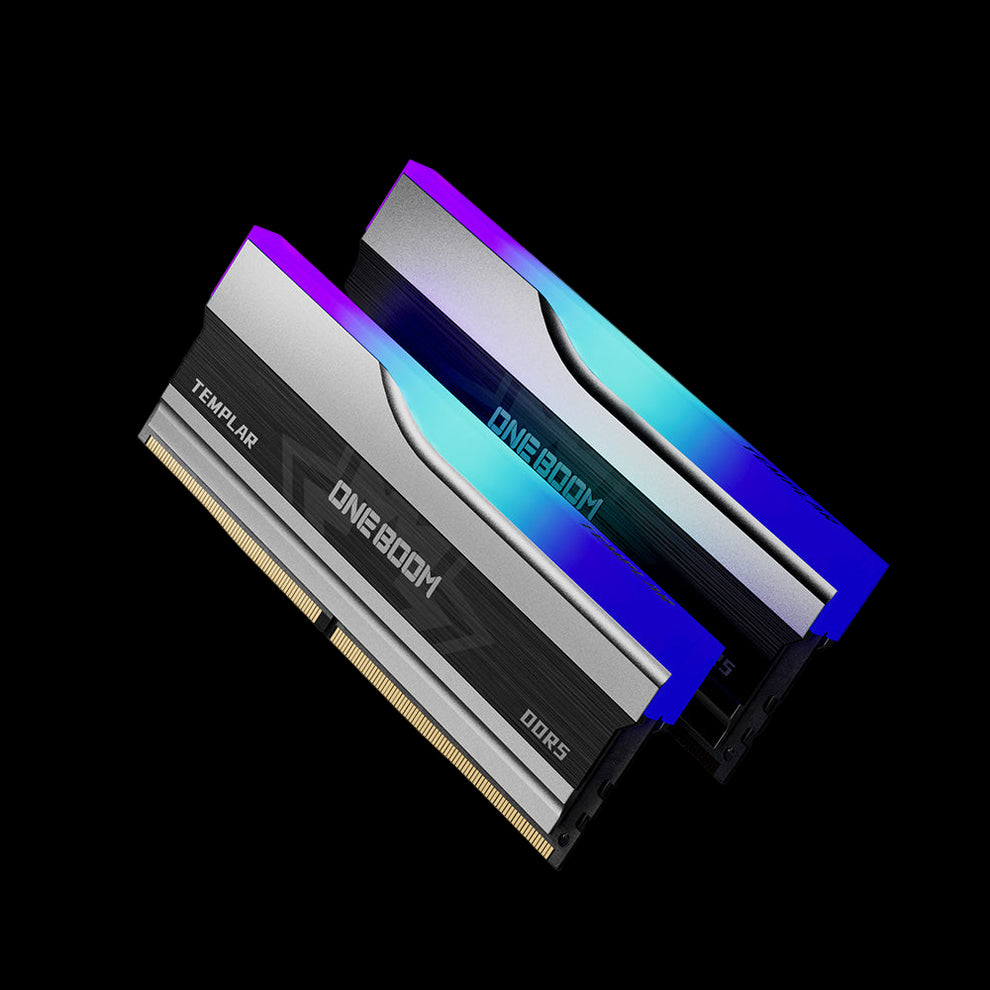
DDR5 RAM Memory RGB Templar
- High DDR5 frequency options
- Supports XMP 3.0 for easy overclocking
- Strong heat spreader design
- Bright and clean RGB lighting
- Stable gaming performance
- Ideal for Intel 13th and 14th Gen CPUs
- Reliable build quality for long-term use
Why This RAM Works Well With Intel
- Works with Intel’s Gear 2 mode
- Designed for 6000 MHz and above
- Good temperature management
- Smooth performance for high FPS gaming
- Excellent match for Z790 and B760 motherboards
If you want a DDR5 kit that performs well and looks clean inside your case, the RGB Templar is a solid choice.
Gaming PC Guide
Building a gaming PC or upgrading RAM? Discover Best RAM for Gaming in 2026.
Conclusion
The best DDR5 RAM speed for the latest Intel processors depends on your motherboard and how you use your PC, but one range stands out. DDR5 6000 MHz is the most stable and practical option for most gamers and creators.
It delivers smooth frame rates, strong multitasking, and simple XMP setup. Higher speeds like 6400 to 7200 MHz help in esports and extreme builds, but they require premium Z790 hardware.
Your system is only as fast as its slowest part, so pair your DDR5 upgrade with a high quality SSD and a stable power supply.
If you are ready to upgrade, check out KingSpec’s DDR5 Templar series and other performance storage products.
Explore More Upgrades:
FAQs About DDR5 RAM Speed for Intel
What is the best DDR5 speed for Intel processors?
Yes. DDR5 6000 MHz is more than enough for modern gaming and gives smooth performance in most titles. This speed helps lower latency and improves frame consistency, especially when paired with a strong CPU and GPU. For most players, you will not notice a big difference above 6000 MHz.
Is DDR5 6000 MHz enough for gaming?
Yes. DDR5 6000 MHz is more than enough for modern gaming and gives smooth performance in most titles. This speed helps lower latency and improves frame consistency, especially when paired with a strong CPU and GPU. For most players, you will not notice a big difference above 6000 MHz.
Does DDR5 automatically run at full speed?
No. Most DDR5 RAM does not run at its full advertised speed right away. It usually starts at a lower default speed until you enable XMP or EXPO in your motherboard’s BIOS. Once activated, the RAM will run at the proper speed listed on the package, as long as your motherboard and CPU support it.
What is the standard speed of DDR5 RAM?
The official standard speed for DDR5 starts at 4800 MHz. Many newer kits now come at higher speeds like 5200, 5600, or 6000 MHz because manufacturers have improved the technology. Even the base 4800 MHz is faster than older DDR4 memory. Choosing a higher speed gives better performance, but it depends on your budget and system needs.

