Kingston is one of the biggest names in memory and storage, and its SSDs show up in prebuilt PCs everywhere. KingSpec's current lineup matches Kingston's specs closely on paper, model for model, and KingSpec's listed prices run noticeably lower than Kingston's current retail prices at comparable capacities. Kingston still holds an edge on warranty length and its SSD Manager software. Here is a full, model by model breakdown sourced directly from both brands.
KingSpec vs Kingston SSD, Quick Comparison
| Category | KingSpec | Kingston | Likely winner |
|---|---|---|---|
| SATA | P3 up to 8TB, 580/570MB/s, from $29.99 | A400 up to 960GB, 500/450MB/s | KingSpec |
| Budget NVMe | NE series PCIe 3.0, up to 3,200/2,000MB/s | NV3 PCIe 4.0, up to 6,000/5,000MB/s | Kingston |
| Flagship NVMe | XG7000 PCIe 4.0, 7,400/6,600MB/s, up to 8TB | FURY Renegade PCIe 4.0, 7,300/7,000MB/s, up to 4TB | Near tie |
| PCIe 5.0 NVMe | X500 up to 14,000/13,000MB/s | No current Kingston equivalent | KingSpec |
| Portable SSD | Z5, 2,100/1,850MB/s, USB 3.2 Gen2x2 | XS2000, 2,000/2,000MB/s, USB 3.2 Gen2x2 | Near tie |
| Software tools | Support varies by model and region | Kingston SSD Manager on every current drive | Kingston |
| Warranty length | 3 years across the current lineup | 5 years on current NVMe and portable models | Kingston |
| Price at comparable capacities | Clearly listed, generally the lower option | Runs higher at current retail prices | KingSpec |
Storage prices have climbed sharply across the industry through 2026, and Kingston's current retail prices reflect that, running noticeably higher today than they did a year ago. KingSpec's listed prices are lower at every comparable capacity checked for this article. Always check current pricing before buying, since both brands' prices can move quickly.
SATA SSDs: KingSpec P3 vs Kingston A400

SATA speed is capped by the interface itself, so most SATA drives land close together on paper. The A400 is Kingston's long running entry level SATA drive, while the P3 is KingSpec's equivalent.
KingSpec P3
Kingston A400
Kingston lists the A400 topping out at 960GB with read and write speeds that vary by capacity, up to 500MB/s read and 450MB/s write on the larger sizes. KingSpec's P3 reads and writes a little faster on paper and goes all the way up to 8TB in the same 2.5 inch form factor, which matters if you want one drive to replace a large mechanical hard drive rather than just your boot drive. Both carry a 3 year warranty. On price, the A400 currently costs more, retail listings for the 480GB model have been running well over $100 in 2026, while KingSpec's P3 starts at $29.99 for 128GB.
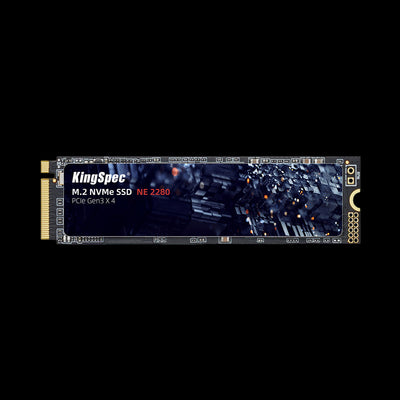
Budget NVMe: KingSpec NE Series vs Kingston NV3
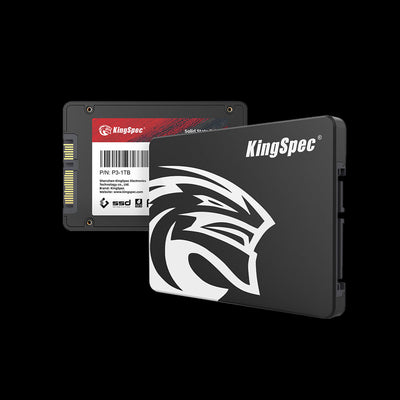
This is the one category where Kingston's own spec sheet shows a clear generational edge. The NV3 runs on a PCIe 4.0 controller, while KingSpec's NE series is built on PCIe 3.0.
| Model | Interface | Read/Write | Max capacity | Warranty |
|---|---|---|---|---|
| KingSpec NE series | PCIe 3.0 x4 | 3,200/2,000 MB/s | 2TB | 3 Years |
| Kingston NV3 | PCIe 4.0 x4 | Up to 6,000/5,000 MB/s | 4TB | 5 Years |
Kingston's NV3 has sequential speeds that scale with capacity, from 5,000/3,000MB/s at 500GB up to 6,000/5,000MB/s at 2TB and 4TB, plus a 5 year warranty. KingSpec's NE series is the more affordable, lower spec option built for a straightforward SATA to NVMe upgrade rather than for chasing PCIe 4.0 bandwidth. If raw NVMe speed at this price tier matters most to you, the NV3 has the edge on paper, though it also costs noticeably more, current retail listings for the 1TB NV3 have been running well above $100, while KingSpec's NE series starts at $45.99.
Flagship NVMe: KingSpec XG7000 and X500 vs Kingston FURY Renegade
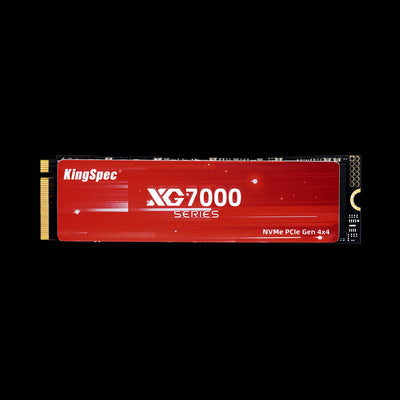
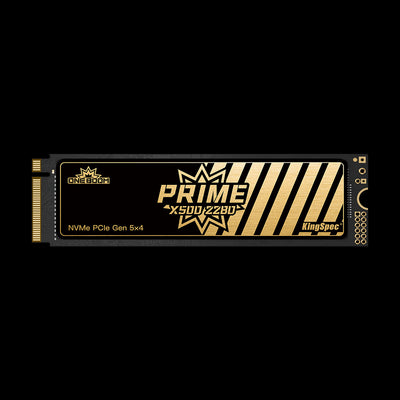
Kingston's gaming focused FURY Renegade is one of the best known PCIe 4.0 drives on the market. KingSpec's XG7000 sits in the same tier, and the X500 goes a generation further with PCIe 5.0.
| Model | Interface | Read/Write | Max capacity | Price |
|---|---|---|---|---|
| KingSpec XG7000 | PCIe 4.0 x4 | 7,400/6,600 MB/s | 8TB | $113.99 (512GB) |
| Kingston FURY Renegade | PCIe 4.0 x4 | Up to 7,300/7,000 MB/s | 4TB | Runs higher, often $250+ at 2TB |
| KingSpec X500 | PCIe 5.0 x4 | 14,000/13,000 MB/s | 4TB | $204.99 (1TB) |
The FURY Renegade uses a Phison E18 controller, 3D TLC NAND with a DRAM cache, and a 5 year warranty, with TBW ratings up to 4,000TB on the 4TB model. KingSpec's XG7000 is rated slightly faster on sequential read and goes up to 8TB, double the FURY Renegade's maximum, while carrying a 3 year warranty and TBW up to 4,000TB on its own 8TB model. Kingston does not currently sell a PCIe 5.0 drive, so the X500 stands on its own here rather than against a direct Kingston match. On price, the XG7000 is a clear win, current retail prices for a 2TB FURY Renegade run well above $200, sometimes past $350, while KingSpec's XG7000 starts at $113.99.
Portable SSDs: KingSpec Z5 vs Kingston XS2000
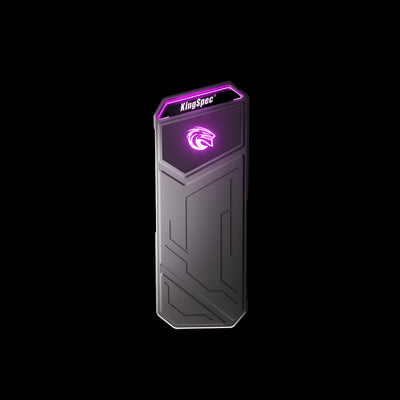
Both brands make a pocketable USB-C drive built around USB 3.2 Gen 2x2 speeds, with very similar specs across the board.
KingSpec Z5
Kingston XS2000
The XS2000 carries an IP55 rating for water and dust resistance and a removable rubber sleeve, plus a 5 year warranty, which is a genuine advantage if you need a drive that can survive outdoor shoots. The Z5 reads and writes a little faster according to KingSpec's numbers and adds an RGB light strip, with a 3 year warranty. KingSpec has not published an IP rating for the Z5, so treat the XS2000's durability certification as its clearest edge. On price, KingSpec wins again, current retail prices for a 1TB XS2000 have been running $150 to $200, while the Z5 starts at $85.99 for 512GB.
Gaming Storage: Capacity Usually Beats Benchmarks
Modern game installs routinely run 80 to 150GB each, so the amount of usable space per dollar tends to matter more than a small gap in sequential speed.
- KingSpec's XG7000 and X500 offer 8TB and 4TB maximum capacities, both above the FURY Renegade's listed 4TB ceiling
- Kingston's FURY Renegade is confirmed PS5 ready, with a heatsink option built in
- The Z5 and XS2000 are both fast enough to run some games directly over USB-C from a laptop or handheld
- Kingston's NV3 is a reasonable step up from SATA for PCIe 4.0 gaming builds on a tighter budget
Everyday Computing: Both Brands Are Fast Enough
Boot times, app launches, and browsing do not come close to saturating even a budget SATA SSD, let alone a PCIe 4.0 drive. For office work, schoolwork, and general home use, a well reviewed KingSpec drive and a comparable Kingston drive will feel effectively identical. The differences that matter most in this category are price, warranty length, and whether you want vendor software installed.
NAND, Endurance, and TBW

Both brands publish TBW (terabytes written) figures for every drive. KingSpec's SATA and NVMe drives use 3D NAND across the lineup, with TBW scaling from 30TB on the smallest P3 capacity up to 4,000TB on the 8TB XG7000. Kingston rates the A400 at 80 to 300TB across its capacity range, the NV3 at 160 to 1,280TB, and the FURY Renegade at 1,000 to 4,000TB depending on capacity. For typical home and office use, writing 20 to 50GB per day, either brand's TBW rating will comfortably outlast the useful life of the computer it is installed in.
Software and Support
Kingston SSD Manager is a free tool included with every current Kingston SSD, used for firmware updates, drive health monitoring, and secure erase. KingSpec's support resources vary by model and region and lean more on documentation and email support than a dedicated management app. Kingston also backs its current NVMe and portable drives with a 5 year warranty, two years longer than KingSpec's 3 year coverage. If you value a longer warranty window and a polished management app, that is where Kingston has the clearest advantage.
Compatibility Checklist Before You Buy
- Confirm SATA or NVMe support on your motherboard or laptop
- Check the PCIe generation your M.2 slot actually supports
- Match the M.2 length, most desktops and laptops use 2280
- Check clearance if the drive ships with a heatsink
- Confirm the maximum capacity your system or BIOS supports
- Compare current prices for both brands before buying, since storage prices have been moving quickly through 2026
- Check the seller's return policy on both KingSpec and Kingston listings
Verdict: KingSpec Wins on Capacity and Price, Kingston Wins on Warranty
For SATA, flagship NVMe, and portable storage, KingSpec offers higher maximum capacities and lower prices than Kingston's current retail pricing at comparable tiers. Kingston's NV3 has a real speed edge in the budget NVMe tier, and Kingston backs its current NVMe and portable drives with a longer 5 year warranty plus its SSD Manager software. If you want the most storage for your money at a lower price, KingSpec is the easier recommendation. If a longer warranty and vendor software matter more to you than price, Kingston is a reasonable choice too.
KingSpec vs Kingston SSD, FAQ
Is KingSpec as reliable as Kingston?
Is KingSpec faster than Kingston?
Is Kingston more expensive than KingSpec?
Which is better for gaming, KingSpec or Kingston?
Does KingSpec work with the same systems as Kingston?
Shop KingSpec SSDs
Get clearly listed pricing and the capacity you actually need.