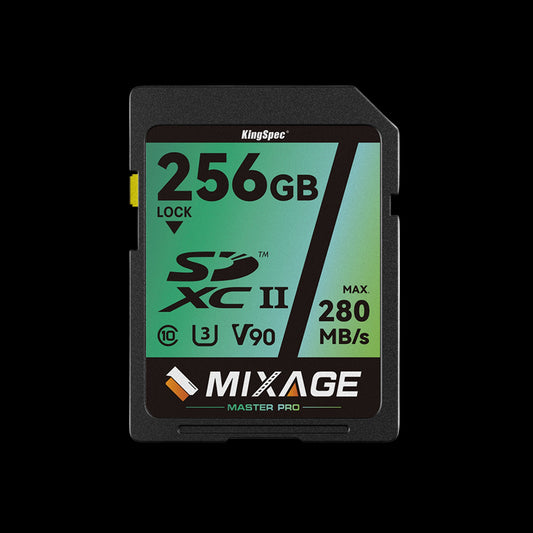
Class 10 SD Card

1 produit
Complete Buying Guide

Class 10 SD Cards 

From full-size SD cards for DSLR cameras and camcorders to everyday storage for printers and dashcams — find the right Class 10 SD card for every device and budget.

Top Brands Compared Speed Classes Explained Capacity Guide Included Expert Recommendations

Class 10 SD cards are the universal standard for reliable, high-speed storage across cameras, camcorders, dashcams, drones, and more. Whether you're shooting Full HD video, capturing burst-mode photography, or expanding storage on a portable device, a genuine Class 10 SD card delivers the minimum 10 MB/s sustained write speed you need. This guide covers everything — speed ratings, capacity options, use cases, and our top picks — so you can buy with confidence.

Why the Right Class 10 SD Card Matters

Speed Guaranteed

Class 10 guarantees a minimum 10 MB/s write speed — the baseline required for smooth Full HD 1080p video recording without dropped frames.

📦

Universal Compatibility

Full-size SD cards are compatible with the widest range of devices — DSLRs, mirrorless cameras, camcorders, laptops, dashcams, and drones.

🛡️

Built to Last

Quality Class 10 SD cards are rated waterproof, temperature-proof, and shockproof — protecting your data in demanding shooting conditions.

💰

Best Value Storage

Class 10 SD cards offer excellent performance at an accessible price point, making them the go-to choice for photographers and videographers of all levels.
Our Top Class 10 SD Card Picks

Understanding SD Card Speed Classes

C2

Class 2

2 MB/s

Minimum write speed. Legacy standard. Not suitable for video recording. Rarely sold today.

C4

Class 4

4 MB/s

Basic write speed. Suitable for standard-definition video only. Largely outdated.

C6

Class 6

6 MB/s

Older standard suitable for HD video. Still found in budget cards but largely replaced by Class 10.

U3

UHS Class 3

30 MB/s

Required for 4K video recording. All U3 cards are also Class 10 rated. Ideal for serious shooters.

V30

Video Class 30

30 MB/s

Optimised specifically for video. Guarantees no dropped frames during 4K and high-bitrate recording.

Choosing the Right Capacity

32 GB

Basic Use

  • ~3,000 photos
  • ~4 hrs HD video
  • Light shooting
  • Short dashcam trips
64 GB

Everyday Use

  • ~6,000 photos
  • ~8 hrs HD video
  • Daily shooting
  • Dashcam daily use
128 GB

Power Use

  • ~12,000 photos
  • ~6 hrs 4K video
  • Travel shooting
  • Extended sessions
256 GB

Pro Use

  • ~24,000 photos
  • ~12 hrs 4K video
  • Full-day events
  • Professional shoots
512 GB

Ultra Use

  • ~48,000 photos
  • ~24 hrs 4K video
  • Multi-day events
  • Cinema shoots
1 TB

Maximum

  • ~96,000 photos
  • ~48 hrs 4K video
  • Enterprise use
  • Long-term storage

Best Class 10 SD Card by Use Case

📷 DSLR & Mirrorless Cameras

Class 10 SD cards are the standard format for DSLR and mirrorless cameras. Fast write speeds handle burst mode RAW files and Full HD video without buffering.

  • U3 V30 for 4K video recording
  • 128GB or 256GB for long sessions
  • High sequential write speeds essential
  • UHS-I U1 minimum for photo shooting

🎥 Camcorders & Video Cameras

Continuous video recording demands sustained write speeds. A Class 10 U3 V30 card guarantees smooth, uninterrupted recording at Full HD and 4K resolutions.

  • V30 rated for 4K continuous recording
  • 64GB to 128GB for standard sessions
  • High endurance for long event shoots
  • Check device's max supported capacity

🚗 Dashcams & CCTV

Dashcams require cards that can handle constant loop recording in extreme heat and cold. High endurance Class 10 cards are specifically built for this purpose.

  • High Endurance rated cards only
  • 64GB or 128GB sweet spot
  • Rated for extreme temperatures
  • U3 V30 for 4K dashcam footage

🚁 Drones & Action Cameras

High-bitrate aerial footage and rugged outdoor conditions demand both speed and physical durability from your Class 10 SD card.

  • V30 minimum, V60 preferred for 6K
  • Waterproof and shockproof rated
  • 128GB or 256GB for full-day flights
  • Fast sequential read for playback

🖨️ Printers & Portable Devices

Photo printers, portable music players, and navigation devices all use full-size SD cards. A Class 10 card ensures fast file access and reliable read performance.

  • U1 Class 10 is more than sufficient
  • 32GB or 64GB covers most needs
  • Check device's supported file system
  • SDHC for devices over 4 years old

💻 Laptops & PC Storage

Many laptops feature built-in SD card slots for storage expansion. A fast Class 10 card can serve as additional working storage for documents, media, and backups.

  • A1 or A2 rated for random read speed
  • 256GB or 512GB for meaningful expansion
  • UHS-I U3 for fast file transfers
  • Format as exFAT for cross-platform use

Class 10 SD Card Speed Comparison

Card Type Read Speed Write Speed 4K Video Burst RAW Best For
Class 10 / U1 Up to 100 MB/s 10 MB/s min HD video, casual photos
Class 10 / U3 V30 Recommended Up to 170 MB/s 30 MB/s min 4K video, DSLR, drones
Class 10 High Endurance Up to 100 MB/s 40 MB/s min Dashcams, CCTV, loop recording
Class 10 V60 UHS-II Up to 280 MB/s 60 MB/s min 6K/8K video, pro cameras
Class 10 V90 UHS-II Up to 300 MB/s 90 MB/s min Cinema cameras, 8K RAW

How to Choose the Right Class 10 SD Card

1

Check Your Device's Requirements

Before purchasing, check your device's manual or manufacturer website for the maximum supported capacity and recommended speed class. Some older cameras cap out at 32GB or 64GB using the SDHC standard, while modern devices support up to 1TB via SDXC. Using a card above the maximum supported capacity can cause errors, formatting issues, or data loss.

2

Match Speed Class to Your Use Case

For basic photo storage and Full HD video, a Class 10 U1 card is sufficient. For 4K video recording or burst-mode RAW photography, you need U3 V30 minimum. For dashcams and security cameras, always choose a High Endurance rated Class 10 card specifically designed for continuous loop recording. For professional cinema cameras, look at V60 or V90 UHS-II cards.

3

Choose the Right Capacity

For casual photography and HD video, 64GB to 128GB covers most needs. Event photographers and videographers should consider 256GB ```html or 512GB to avoid swapping cards mid-shoot. For dashcams, 64GB to 128GB is the sweet spot for loop recording cycles. Remember — it's often better to carry multiple smaller cards than one large card, reducing the risk of losing all your footage if a card fails.

4

Look Beyond the Speed Rating

The speed class printed on a card is the minimum guaranteed write speed, not the maximum. Always check the manufacturer's actual read and write speeds listed in the product specifications. A card marked Class 10 might write at 10 MB/s or 90 MB/s — the Class 10 label alone doesn't tell the full story. Choose cards from reputable brands with clearly published performance figures.

5

Consider Durability and Protection Ratings

For outdoor photography, action cameras, and dashcams, choose a Class 10 SD card rated waterproof, shockproof, temperature-proof, and X-ray proof. Most quality Class 10 cards from reputable manufacturers include these protections as standard. If you're shooting in extreme cold, wet environments, or dusty conditions, these ratings are non-negotiable for keeping your data safe.

6

Buy From a Trusted Source

Counterfeit SD cards are unfortunately common on online marketplaces. Always buy from authorised retailers or directly from reputable brands. Fake cards often misreport their capacity and speed, leading to data corruption or loss. Verify the card's speed and capacity after purchase using tools like H2testw or CrystalDiskMark to confirm the card performs as advertised.

💡 Pro Tips for Getting the Most From Your Class 10 SD Card

  • Format in-device: Always format your SD card in the camera or device you'll be using it in, not on your computer. This ensures the correct file system and allocation unit size for that device.
  • Don't fill to 100%: Leave at least 10–15% of your card's capacity free. Overfilling an SD card can slow write speeds and increase the risk of file corruption.
  • Use a card reader for transfers: Transferring files via a dedicated USB 3.0 card reader is significantly faster than using your camera as a card reader via USB cable.
  • Back up before formatting: Never format a card until you've confirmed all files are safely backed up in at least two separate locations.
  • Keep spare cards: Professional photographers and videographers always carry multiple Class 10 SD cards. Never rely on a single card for an important shoot or event.
  • Store cards safely: Use a dedicated card case to protect SD cards from static, dust, and physical damage. Avoid leaving cards in hot cars or humid environments.
  • Update your camera firmware: Some cameras require firmware updates to support larger capacity or newer speed class SD cards. Check the manufacturer's website regularly.
  • Label your cards: Use small adhesive labels or a permanent marker to number your cards. This helps with organised workflows on multi-card shoots.
⚠️

Watch Out for Fake Class 10 SD Cards: The SD card market is flooded with counterfeit products that display false speed ratings and capacities. Cards claiming extremely high speeds at unusually low prices are almost always fake. Stick to reputable brands with verifiable specifications, purchase from authorised retailers, and always test a new card's true speed and capacity before using it on an important shoot. Data lost to a fake card is rarely recoverable.

Frequently Asked Questions About Class 10 SD Cards

What does Class 10 mean on an SD card?
Class 10 is a speed classification defined by the SD Association. It means the card has a minimum sustained write speed of 10 MB/s — the standard required for smooth Full HD 1080p video recording. The number inside the 'C' symbol on the card indicates the class. Class 10 is currently the most widely used and recommended speed class for everyday photography and video recording devices.
Is Class 10 good enough for 4K video?
A standard Class 10 / U1 card is not recommended for 4K video recording. While Class 10 guarantees 10 MB/s minimum write speed, 4K video typically requires 30 MB/s or more sustained write speed. For 4K recording, you need a Class 10 U3 V30 card at minimum. The U3 rating guarantees 30 MB/s minimum write speed, and the V30 Video Speed Class is specifically optimised for continuous video recording at 4K resolutions.
What is the difference between Class 10, U1, U3, and V30?
These are all different speed classification systems defined by the SD Association. Class 10 (C10) guarantees 10 MB/s minimum write. UHS Speed Class 1 (U1) also guarantees 10 MB/s minimum but on UHS-I or UHS-II buses. UHS Speed Class 3 (U3) guarantees 30 MB/s minimum write. Video Speed Class 30 (V30) also guarantees 30 MB/s minimum and is specifically optimised for video workloads. A card can carry multiple ratings simultaneously — for example, a card can be Class 10, U3, and V30 at the same time.
How long does a Class 10 SD card last?
Quality Class 10 SD cards from reputable manufacturers are rated for 10,000 or more write/erase cycles per memory cell, with a typical lifespan of 5–10 years under normal use. However, longevity depends heavily on usage patterns — dashcam and CCTV applications that write continuously will wear cards faster than a camera card used occasionally. For high-write applications, always choose a High Endurance rated Class 10 card which is specifically designed for extended write cycles.
What is the difference between SDHC and SDXC Class 10 cards?
SDHC (Secure Digital High Capacity) covers capacities from 2GB to 32GB and uses the FAT32 file system. SDXC (Secure Digital eXtended Capacity) covers capacities from 32GB to 2TB and uses the exFAT file system. Both can be Class 10 rated. The key difference is compatibility — older devices may only support SDHC cards up to 32GB. Always check your device's specifications before purchasing a high-capacity SDXC card.
Can I use a Class 10 SD card in an older camera that recommends Class 6?
Yes — Class 10 SD cards are backward compatible with devices designed for lower speed classes. A camera that recommends Class 6 will work perfectly with a Class 10 card. The device will simply operate at its own maximum supported speed. However, always check the device's maximum supported capacity, as older cameras may not recognise cards above 32GB regardless of the speed class.
How do I know if my Class 10 SD card is genuine?
After purchasing, test your card using free tools like H2testw (Windows) or F3 (Mac/Linux) to verify the actual capacity matches what's stated. Use CrystalDiskMark or ATTO Disk Benchmark to confirm read and write speeds match the manufacturer's published figures. Genuine cards from reputable brands will consistently hit their advertised speeds. If a card significantly underperforms or shows a different usable capacity than stated, it is likely counterfeit and should be returned immediately.
Do I need a special card reader for Class 10 SD cards?
To take full advantage of a fast Class 10 UHS-I card's read speeds, you need a USB 3.0 card reader that supports UHS-I. A USB 2.0 reader will bottleneck transfer speeds to around 25 MB/s regardless of the card's rated speed. For UHS-II cards, you need a UHS-II compatible reader to access the full speed potential. For everyday use and basic transfers, any USB 3.0 SD card reader is sufficient for Class 10 U1 and U3 cards.

Find Your Perfect Class 10 SD Card

Browse our full range of Class 10 SD cards — from everyday U1 cards for HD photography to high-endurance U3 V30 cards for 4K video and dashcam recording. Fast shipping, genuine products, and performance you can trust.

Shop All Class 10 SD Cards

You May Also Like

NX series M.2 NVMe 2280 PCIe 3.0 SSD

Prix promotionnel À partir de $67.99 Prix normal $73.99

XG7000 M.2 NVMe 2280 PCIe 4.0 SSD

Prix promotionnel À partir de $121.99 Prix normal $124.99

NE series M.2 NVMe 2280 PCIe 3.0 SSD

Prix promotionnel À partir de $48.99 Prix normal $50.99