
Best SSD for UGREEN NAS: Bays, Cache, and Compatibility
The best SSD for a UGREEN NAS is the exact drive model validated for your NASync model and intended role. Use a compatible 2.5-inch SATA SSD for main-bay storage or a compatible M.2 NVMe SSD for cache or an M.2 storage pool when UGOS Pro and the NAS model support it.
KingSpec P3 SATA and XG7000 NVMe drives fit those broad profiles, but an unlisted KingSpec part should not be treated as UGREEN-certified.
- UGREEN NASync models can have SATA bays, M.2 NVMe slots, or both.
- Check UGREEN's compatibility list by exact NAS and drive model number.
- Main storage, cache, and all-flash pools have different priorities.
- RAID is availability, not a backup.
- Network speed can hide the difference between SATA and NVMe.
Recommended KingSpec Options
 KingSpec option
KingSpec P3 2.5-inch SATA III SSD
A 2.5-inch SATA drive profile for compatible NAS main bays. Confirm the exact KingSpec part number in UGREEN's compatibility tool before purchase.
 KingSpec option
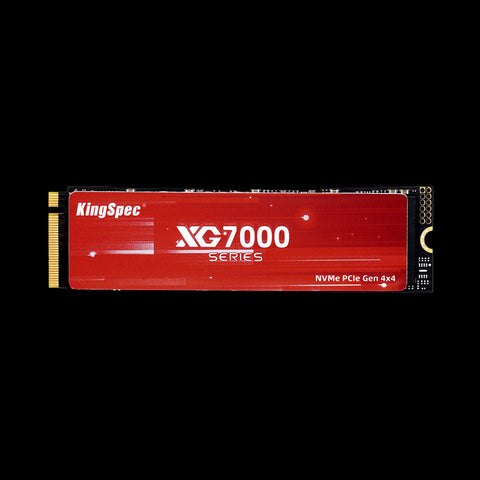
KingSpec XG7000 M.2 NVMe 2280 PCIe 4.0 SSD
A 2280 NVMe profile for compatible M.2 slots used as cache or storage. The NAS slot, firmware, thermal conditions, and compatibility list determine suitability.
Identify the Storage Role Before the Drive
A NAS can use SSDs in three ways. Main-bay SSDs hold the files and participate in a storage pool. Cache SSDs keep frequently accessed blocks closer to the processor. Some UGREEN models can use M.2 drives as a separate high-speed storage pool. The same drive is not automatically ideal for all three roles.
UGREEN's DXP4800 Plus, for example, is specified with four SATA bays and two M.2 SSD slots. Other NASync models have different counts, network ports, and maximum capacities. Select the exact NAS model in UGREEN's compatibility list before evaluating brand, speed, or price.
SATA SSD vs NVMe SSD in a UGREEN NAS
| Role | Typical connection | Priority | Common limit |
|---|---|---|---|
| Main storage pool | 2.5-inch SATA | Endurance, capacity, consistent behavior | Network and SATA interface |
| Read cache | M.2 NVMe | Random reads, thermals, compatibility | Workload locality |
| Read/write cache | M.2 NVMe pair | Endurance, protection, stable writes | Firmware and cache policy |
| M.2 storage pool | M.2 NVMe | Capacity, cooling, sustained performance | Model and UGOS support |
A 1GbE network tops out far below modern NVMe peak speeds. Faster networking, multiple clients, virtual machines, and database workloads are more likely to benefit from NVMe. For ordinary backups and media serving, capacity and reliability usually matter more than a benchmark headline.
Why Exact Compatibility Matters
UGREEN states that an unlisted component is not automatically incompatible, but it has not been verified for stability and performance on that NAS model. For important data, a tested model is the conservative choice. Match the complete product number, capacity, protocol, and firmware context.
Physical fit is only the first check. NAS firmware must recognize the controller, report health correctly, manage sleep and power states, and behave predictably during RAID rebuilds. If you test an unlisted drive, do it with noncritical data and maintain a separate verified backup.
Capacity, Endurance, and RAID Planning
Usable RAID capacity is based on the smallest drive in the array, and protection consumes capacity. Plan the pool with UGREEN's RAID calculator rather than multiplying the label capacity by the number of bays. Leave free space for snapshots, application data, and growth.
Endurance matters when the NAS receives frequent backups, camera recordings, virtual-machine writes, or cache traffic. Compare the exact drive's TBW specification and warranty terms with the expected workload. Do not infer endurance from interface speed or NAND marketing alone.
Deployment Checklist
- Update UGOS Pro and record the existing storage configuration.
- Verify the exact drive model and capacity in UGREEN's compatibility list.
- Back up the NAS before changing pools, cache, or RAID membership.
- Install drives with the NAS powered down when the manual requires it.
- Create the pool or cache using the supported wizard and review warnings.
- Run SMART tests, monitor temperature, and test restoring a backup.
RAID can keep services available after some drive failures, but deletion, malware, enclosure failure, and configuration mistakes can affect every member. Keep another copy outside the NAS.
Match the SSD to Your Network
A NAS delivers files through a network, so storage performance is only one part of the path. A single 1GbE connection has a theoretical ceiling near 125MB/s before protocol overhead, which is already below SATA SSD capability. A 2.5GbE or 10GbE connection creates more room for faster storage, but clients, switches, cables, and file protocols must support the same speed.
NVMe becomes more valuable for multiple simultaneous clients, virtual machines, containers, databases, indexing, and small random I/O. A home media library that mostly streams large sequential files may not feel different after adding cache. Measure the workload first: queue depth, repeated reads, active users, and network utilization reveal whether storage is the bottleneck.
Read Cache, Write Cache, and Data Risk
Read cache keeps copies of frequently requested blocks. If a read-cache SSD fails, the original data remains in the storage pool. Write cache can temporarily hold data that has not yet reached the main array, so its protection and failure behavior require more care. Follow UGOS Pro guidance on drive count, cache mode, and safe removal.
Do not use consumer power-loss assumptions as a substitute for a UPS and backups. Sudden power loss can affect the NAS, cache metadata, and active writes. A compatible UPS that supports safe shutdown improves resilience, but it still does not protect against deletion, ransomware, theft, or a failed restore process.
Replacing or Expanding NAS SSDs
Read the storage-manager warnings before removing any member of a pool. RAID rebuilds stress every remaining drive and can take a long time. Replace one drive at a time only when the selected RAID level and UGREEN procedure allow it. Confirm pool health after each rebuild before continuing.
When expanding with larger drives, usable space may not increase until enough array members are replaced and the pool is expanded. Snapshots also consume capacity as changed blocks accumulate. Keep free-space alerts enabled, schedule SMART tests, and review drive temperatures after adding M.2 devices because compact NAS enclosures can have different airflow around the cache slots.
Use KingSpec's internal SSD collection to understand available formats, then return to UGREEN's exact compatibility result before selecting a SKU.
How We Chose the Recommendations
This guide starts with compatibility because a fast component that does not fit or is not recognized has no value. We then consider sustained behavior, capacity, thermal conditions, power, and the actual workload. Product-page maximums are treated as laboratory or interface capabilities, not guaranteed results in every host.
For third-party devices, the device manufacturer's current manual and compatibility list take priority. Firmware revisions and hardware generations can change support. KingSpec specifications are used only for KingSpec product facts, while installation and platform requirements come from the relevant device documentation.
Practical Buying Checklist
- Write down the exact device model and hardware revision.
- Confirm physical format, interface, capacity limit, and required speed class.
- Choose capacity for the next several years, while preserving free working space.
- Check power, cooling, cable, and enclosure requirements.
- Plan backup, migration, formatting, and recovery before installation.
- Test the component under the real workload before trusting important data to it.
Compatibility note: Listings and firmware change. Recheck the linked live pages before publication and purchase.
How to Make the Final Choice
Turn the shortlist into a decision by writing down three non-negotiable requirements for best ssd for ugreen nas: confirmed compatibility, enough usable capacity, and stable performance in the intended workload. Eliminate any option that fails a required format, interface, or manufacturer limit even when its price or peak speed looks attractive. Compare remaining products by current capacity, warranty terms, installation needs, and the supporting equipment you may need.
Include the total cost of the change. An adapter, enclosure, card reader, cable, thermal pad, mounting hardware, cloning tool, or backup drive can change which option offers the best value. Delivery time and the ability to restore the original configuration also matter when the device is used for work. Avoid paying for interface performance that the host cannot use unless the drive will soon move to a faster system.
After Installation: Test Before You Trust It
A component appearing in the operating system is only the first check. Format it through the supported workflow, install current firmware where appropriate, and run a representative transfer or recording task. Restart or power-cycle the host, verify that capacity is reported correctly, and watch for connection resets, slow-media warnings, unusual temperatures, or file-system errors.
Keep the previous storage or memory configuration available until the new setup has passed normal use. Verify backups by opening files from the backup destination rather than assuming that a completed copy dialog proves recovery. For business, creative, server, or irreplaceable data, use an independent backup and document the exact model numbers and settings. That record turns future troubleshooting into a comparison against a known working state instead of guesswork.
Frequently Asked Questions
Can I use any SSD in UGREEN NAS?
Should I use SATA or NVMe?
Does SSD cache always make a NAS faster?
Is RAID a backup?
Final Answer
The best SSD for a UGREEN NAS is the exact drive model validated for your NASync model and intended role. Use a compatible 2.5-inch SATA SSD for main-bay storage or a compatible M.2 NVMe SSD for cache or an M.2 storage pool when UGOS Pro and the NAS model support it. KingSpec P3 SATA and XG7000 NVMe drives fit those broad profiles, but an unlisted KingSpec part should not be treated as UGREEN-certified.
Confirm the exact host requirements and current KingSpec specification before purchase. Back up important data before changing storage or memory hardware.
Related KingSpec Resources

