
Best SD Card for Drone: A Practical Buying Guide
For most consumer drones that record 4K video, the best starting point is a genuine UHS-I microSD card rated U3 and V30 in a capacity explicitly supported by the aircraft.
The KingSpec MicroSD TF Card is a UHS-I microSD option whose live specifications list up to 175MB/s read, up to 110MB/s write, and capacities from 32GB to 512GB. Your drone manual and approved-card list still decide whether a particular capacity and model are suitable.
- Match microSD versus full-size SD before comparing speed.
- Use the drone maker's approved capacity and card list as the final authority.
- U3 and V30 indicate sustained-write capability suited to many 4K drone modes.
- Buy from a reliable source, format in the aircraft, and carry a spare.
- Offload and back up footage after each important flight.
Recommended KingSpec Options
 KingSpec option
KingSpec MicroSD TF Card
UHS-I microSD; live specifications list up to 175MB/s read and 110MB/s write, with multiple capacities. Best candidate when the drone requires UHS-I U3/V30 and the exact card is accepted.
 KingSpec option
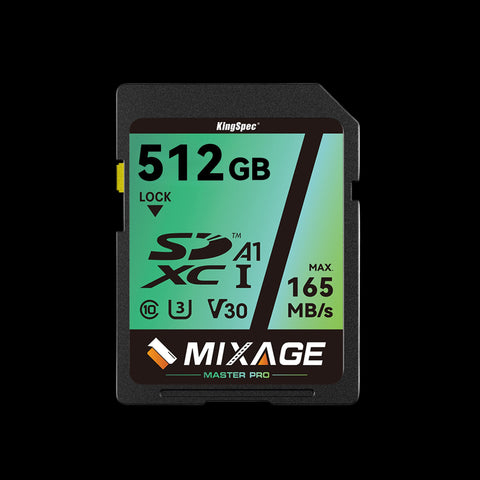
KingSpec SDXC UHS-I U3 V30
A full-size SD card for controllers, cameras, or equipment that specifically accepts standard SD. It does not fit a drone microSD slot without changing the physical format.
What Makes a Drone Memory Card Different?
Aerial video creates a continuous stream of data. A card can advertise a high peak read speed yet still stop recording if its sustained write performance is too low. That is why drone specifications often name UHS Speed Class 3, shown as U3, and Video Speed Class 30, shown as V30. V30 represents a minimum sustained write class of 30MB/s, while the camera's bitrate determines how much throughput the recording actually needs.
DJI's official storage-card guidance lists model-specific requirements and, for many aircraft, recommends UHS-I U3 or V30 microSD cards. The list is not identical across every drone. Maximum capacity, supported file system, temperature, and controller storage can differ, so a generic claim that one card fits all drones is unreliable.
Speed Classes Explained Without the Alphabet Soup
| Mark | What it describes | Buying implication |
|---|---|---|
| Class 10 | Legacy minimum sequential write class | Not enough information by itself for modern high-bitrate video. |
| U3 | UHS minimum write-performance class | Common requirement for 4K-capable consumer drones. |
| V30 | Video minimum sustained write class | Useful baseline when the drone specifies V30. |
| A1/A2 | Application random-access rating | Helpful for apps, but not the main video-recording requirement. |
| UHS-I | Bus interface | Match the interface supported by the aircraft or controller. |
Do not add every number together. Read speed mainly affects offloads. Sustained write class protects recording continuity. The bus interface sets the communication ceiling, and the drone can only use what its slot supports.
How Much Capacity Should You Buy?
Capacity should cover the planned flight day without encouraging you to leave the only copy of valuable footage in the aircraft. A 64GB or 128GB card is often easier to manage than one enormous card because it limits the amount exposed to loss in a single incident. Higher resolutions, frame rates, codecs, and long recording sessions use more space.
Check the maximum capacity in the manual. A card larger than the supported limit may fail to format or record reliably. Keep at least two cards, label them, and rotate after major flights. Capacity is inexpensive compared with recreating a location shoot.
Drone SD Card Setup and Care
Confirm the exact requirement
Use the aircraft and controller model numbers to check format, speed class, and maximum capacity.
Format in the device
After backing up existing files, use the drone or controller format command so the card receives the expected file system.
Run a test recording
Record at the highest mode you expect to use, review the clip, and check for warnings before a paid or important flight.
Offload and verify
Copy footage to two locations, open several files, then clear the card only after verification.
Common Drone Card Mistakes
Avoid counterfeit cards, charge-only readers, and cards selected solely by the largest printed speed. Do not remove power while the aircraft is writing a file. Replace a card that develops repeated recording errors, becomes read-only unexpectedly, or fails verification after formatting.
Temperature and impact matter too. Store cards in a case, keep contacts clean, and allow equipment to acclimate when moving between extreme environments. A spare card is useful only when it has already been tested in the same drone.
Recording Bitrate Matters More Than Resolution Alone
Two drones can both advertise 4K recording while writing very different amounts of data each second. Frame rate, color depth, codec, compression setting, and HDR mode all change bitrate. A 4K/30 recording with efficient compression may be less demanding than 4K/120 or an intraframe format. Use the highest-bitrate mode in the drone specification when checking the card requirement.
A V30 card is designed to sustain at least its rated video-class floor, but the complete card and device combination still needs testing. Firmware, temperature, file-system condition, and a nearly full card can affect behavior. If the aircraft reports a slow-card warning, stop using that recording mode until the cause is resolved. Repeated warnings are a reason to replace or revalidate the card, not something to dismiss because short clips appear normal.
How Many Minutes Fit on a Drone SD Card?
Estimate recording time from bitrate instead of using a universal minutes-per-gigabyte claim. Divide the video bitrate by eight to convert megabits per second to approximate megabytes per second, multiply by 60 for a minute, and allow extra room for file-system overhead, photos, thumbnails, and telemetry. For example, a 100Mb/s stream is roughly 12.5MB/s before overhead, or about 750MB per minute.
This calculation is a planning estimate, not a promise. Variable-bitrate codecs change their data rate with scene complexity, and the drone may reserve space. Check the remaining-time display after formatting the card in the aircraft. Leave margin for a return flight or an unexpected second take rather than planning to use the final available megabyte.
Field Workflow for Reliable Aerial Footage
Assign each card a simple identifier and record when it was used. At the end of a flight block, lock or case the exposed card and insert a fresh tested card. This prevents accidental formatting and makes it clear which media has not been copied. Avoid editing directly on the only card; ingest footage to a fast working drive and create another copy before organizing or deleting clips.
After copying, compare file counts and total bytes, then open clips from the destination. Professional ingest software can create checksums, but even a disciplined manual check is better than assuming a progress bar proves the files are safe. Keep cards away from moisture, loose metal, and heat inside a parked vehicle. Retire questionable media from flight duty even if it remains usable for noncritical transfers.
How We Chose the Recommendations
This guide starts with compatibility because a fast component that does not fit or is not recognized has no value. We then consider sustained behavior, capacity, thermal conditions, power, and the actual workload. Product-page maximums are treated as laboratory or interface capabilities, not guaranteed results in every host.
For third-party devices, the device manufacturer's current manual and compatibility list take priority. Firmware revisions and hardware generations can change support. KingSpec specifications are used only for KingSpec product facts, while installation and platform requirements come from the relevant device documentation.
Practical Buying Checklist
- Write down the exact device model and hardware revision.
- Confirm physical format, interface, capacity limit, and required speed class.
- Choose capacity for the next several years, while preserving free working space.
- Check power, cooling, cable, and enclosure requirements.
- Plan backup, migration, formatting, and recovery before installation.
- Test the component under the real workload before trusting important data to it.
Compatibility note: Listings and firmware change. Recheck the linked live pages before publication and purchase.
How to Make the Final Choice
Turn the shortlist into a decision by writing down three non-negotiable requirements for best sd card for drone: confirmed compatibility, enough usable capacity, and stable performance in the intended workload. Eliminate any option that fails a required format, interface, or manufacturer limit even when its price or peak speed looks attractive. Compare remaining products by current capacity, warranty terms, installation needs, and the supporting equipment you may need.
Include the total cost of the change. An adapter, enclosure, card reader, cable, thermal pad, mounting hardware, cloning tool, or backup drive can change which option offers the best value. Delivery time and the ability to restore the original configuration also matter when the device is used for work. Avoid paying for interface performance that the host cannot use unless the drive will soon move to a faster system.
After Installation: Test Before You Trust It
A component appearing in the operating system is only the first check. Format it through the supported workflow, install current firmware where appropriate, and run a representative transfer or recording task. Restart or power-cycle the host, verify that capacity is reported correctly, and watch for connection resets, slow-media warnings, unusual temperatures, or file-system errors.
Keep the previous storage or memory configuration available until the new setup has passed normal use. Verify backups by opening files from the backup destination rather than assuming that a completed copy dialog proves recovery. For business, creative, server, or irreplaceable data, use an independent backup and document the exact model numbers and settings. That record turns future troubleshooting into a comparison against a known working state instead of guesswork.
Frequently Asked Questions
Is V30 enough for 4K drone video?
Can I use any microSD card in a DJI drone?
Should I choose 128GB or 256GB?
How often should I format the card?
Final Answer
For most consumer drones that record 4K video, the best starting point is a genuine UHS-I microSD card rated U3 and V30 in a capacity explicitly supported by the aircraft. The KingSpec MicroSD TF Card is a UHS-I microSD option whose live specifications list up to 175MB/s read, up to 110MB/s write, and capacities from 32GB to 512GB. Your drone manual and approved-card list still decide whether a particular capacity and model are suitable.
Confirm the exact host requirements and current KingSpec specification before purchase. Back up important data before changing storage or memory hardware.
Related KingSpec Resources

